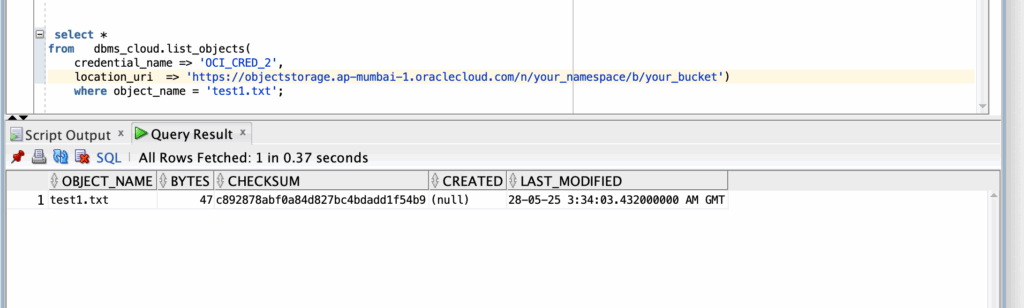

In our previous blog we have seen uploading, deleting and fetching OCI Object Storage file using APEX_WEBSERVICE API. If you’re using Oracle Autonomous Database, you can directly use the DBMS_CLOUD package to interact with your OCI Buckets — no need to manually handle HTTP headers or web credentials.
In this article, we will guide you on how to upload, download, and delete files from an OCI bucket using DBMS_CLOUD.
Prerequisites
Oracle Autonomous Database (ATP/ADW)
DBMS_CLOUD access granted
OCI Account with Object Storage bucket created
Auth token for the OCI user
Step 1: Setup Credentials Using
DBMS_CLOUD.CREATE_CREDENTIAL
We first need to create credentials for accessing the OCI Object Storage.
Example:
BEGIN
DBMS_CLOUD.CREATE_CREDENTIAL(
credential_name => ‘OCI_CRED_2’,
username => ‘your_email@example.com’,
password => ‘your_oci_auth_token’
);
END;
Username is your OCI user login (usually your email)
Password is the OCI Auth Token, not your normal password
Generate this from: OCI Console → Identity → Users → Auth Tokens
Step 2: Upload File to OCI Bucket
Upload Example:
DECLARE
l_blob BLOB;
l_clob CLOB := ‘This is a sample text file generated in PL/SQL.’;
l_dest_off INTEGER := 1;
l_src_off INTEGER := 1;
l_lang_ctx INTEGER := DBMS_LOB.DEFAULT_LANG_CTX;
l_warning INTEGER;
BEGIN
— Initialize a temporary CLOB and BLOB
DBMS_LOB.CREATETEMPORARY(l_blob, TRUE);
— Convert CLOB to BLOB
DBMS_LOB.CONVERTTOBLOB(
dest_lob => l_blob,
src_clob => l_clob,
amount => DBMS_LOB.LOBMAXSIZE,
dest_offset => l_dest_off,
src_offset => l_src_off,
blob_csid => DBMS_LOB.DEFAULT_CSID,
lang_context => l_lang_ctx,
warning => l_warning
);
DBMS_CLOUD.PUT_OBJECT (
credential_name => ‘OCI_CRED_2’,
object_uri => ‘https://objectstorage.ap-mumbai-1.oraclecloud.com/n/your_namespace/b/your_bucket/o/test1.txt’,
contents => l_blob
);
DBMS_LOB.FREETEMPORARY(l_blob);
end;
Best Practices:
Make sure object_uri contains the full bucket URL
file_name can refer to a table/column or an accessible directory (in ATP, APEX files are accessible)
Step 3: Download File from OCI Bucket
You can download the file from OCI to a local directory or directly stream via URL in APEX.
Download File (Copy to Directory):
BEGIN
DBMS_CLOUD.GET_OBJECT(
credential_name => ‘OCI_CRED_2’,
object_uri => ‘https://objectstorage.ap-mumbai-1.oraclecloud.com/p/your_namespace/b/your_bucket/o/test1.txt’,
directory_name => ‘your_directory_name’,
file_name => ‘test1.txt’ — local directory in ATP
);
DBMS_OUTPUT.put_line(‘File downloaded successfully!’);
END;
Save to table
declare
l_blob blob;
begin
l_blob := dbms_cloud.get_object (
credential_name => ‘OCI_CRED_2’,
object_uri => ‘https://objectstorage.ap-mumbai-1.oraclecloud.com/p/your_namespace/b/your_bucket/test1.txt’);
—Insert into your local table
end;
/
Step 4: Delete File from OCI Bucket
Use DBMS_CLOUD.DELETE_OBJECT to remove files.
Delete File Example:
BEGIN
DBMS_CLOUD.DELETE_OBJECT(
credential_name => ‘OCI_CRED_2’,
object_uri => ‘https://objectstorage.ap-mumbai-1.oraclecloud.com/p/your_namespace/b/your_bucket/o/test1.txt’
);
DBMS_OUTPUT.put_line(‘File deleted successfully!’);
END;
Summary
Using DBMS_CLOUD in Oracle Autonomous Database is the easiest and most secure way to interact with OCI Object Storage in your APEX application.
No need to manage REST headers or encode URLs manually!
Need expert help in integrating APEX with OCI?
Contact us at contact@ontoorsolutions.com
#orclapex #OracleAPEX #DBMSCLOUD #OCI #AutonomousDB #OntoorSolutions
The post Store and Access Files in OCI Bucket Using DBMS_CLOUD in Oracle APEX appeared first on Ontoor blogs.