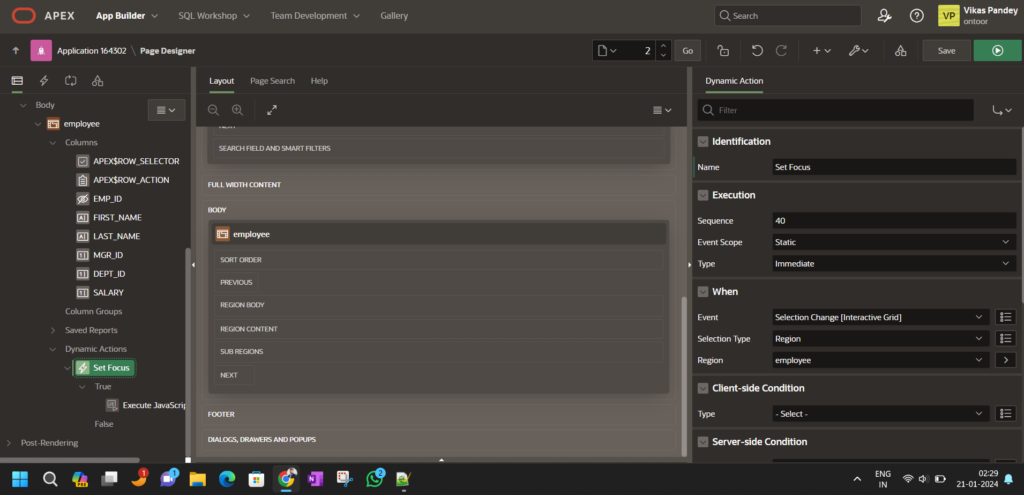

Create a Dynamic Action:
Create a Dynamic Action with the following settings:
Event: Selection Change{IG}
Selection Type: Execute JavaScript Code
apex.jQuery(document).ready(function() {
// Get the Interactive Grid widget
var ig$ = apex.region(“emp”).widget().interactiveGrid(“getViews”).grid.view$;
// Ensure that the Interactive Grid widget is defined
if (ig$) {
// Get the ID of the currently active record
var activeRecordId = ig$.grid(“getActiveRecordId”);
// Check if an active record exists
if (activeRecordId) {
// Specify the column name (replace “COLUMN_NAME” with your column name)
var columnName = “SALARY”;
// Use gotoCell to navigate to the specified cell in the current row
ig$.grid(“gotoCell”, activeRecordId, columnName);
} else {
console.log(“No active record.”);
}
} else {
console.log(“Interactive Grid is undefined.”);
}
}) ;
var ig = apex.region(“emp”).widget().interactiveGrid(“getViews”,”grid”);
var rec = ig.model.recordAt(2);
ig.view$.grid(“gotoCell”, rec[0], “SAL”);
The post Add Row | Focus column- gotoCell | Interactive Grid appeared first on Ontoor blogs.